

Views: 0 Author: Site Editor Publish Time: 2026-10-18 Origin: Site


Designing a Printed Circuit Board for a tightly constrained enclosure is a familiar headache for hardware engineers. Board real estate is expensive. Mechanical reliability and signal integrity are non-negotiable. Selecting the right PCB connectors involves much more than counting pins or checking pitch dimensions. The actual mounting orientation fundamentally dictates how your board interacts with the physical world.
When deciding between a vertical versus right-angle connector, engineers must weigh spatial limitations against mechanical stress and electrical performance. A simple choice in component geometry can ripple through the entire design. It affects trace routing, enclosure profiles, and even automated assembly yields. This guide breaks down the core structural differences, mechanical impacts, and real-world application scenarios. The goal is to help you lock in the optimal design choice for your next hardware iteration.
Space Optimization: Vertical configurations conserve horizontal real estate on the X/Y-axis. Right-angle alternatives are the go-to solution for ultra-low-profile Z-axis designs.
Mechanical Stress: Mating directions shift the load. Side-entry parts transfer insertion force parallel to the substrate, frequently requiring reinforced solder joints or robust mounting hardware to prevent pad delamination.
Signal Integrity: Physical orientation alters trace lengths. The 90-degree bend in bent pins can introduce minor impedance variations, complicating high-speed signal routing.
Application Specifics: System architecture drives the decision. Cable trajectories and multi-board stacking configurations usually dictate the final hardware selection.
Before diving into complex routing or mechanical shear forces, we need to establish a clear baseline. The physical geometry of these components dictates how the board will eventually interface with external cables or secondary boards.
Often labeled as straight components, these feature internal contacts and outer housings that sit perfectly perpendicular to the PCB surface. The metallic pins extend straight down into the fiberglass substrate at a strict 90-degree angle relative to the horizontal plane.
The standard mating direction here is top-down. During assembly or field use, the technician inserts the corresponding plug directly toward the face of the board. Because of their straightforward geometry, these components dominate unconstrained environments. You will see them heavily used in desktop computer motherboards, industrial control cabinets, and bulky consumer appliances where overhead clearance is plentiful.
These components take a different geometric approach. The main body and the mating interface sit parallel to the PCB surface. To achieve the electrical connection, the internal metallic pins bend at a precise 90-degree angle. They exit the rear or bottom of the housing to solder into the board.
Specifically, the mating direction for these ports is horizontal. This is commonly referred to as side-entry. The external plug slides in parallel to the PCB. This orientation is highly specialized for situations where vertical height is severely limited. By shifting the mating axis from the vertical plane to the horizontal plane, engineers can keep the overall profile of the assembled board entirely flat.
Every time a user plugs or unplugs a cable, kinetic energy transfers straight through the plastic housing and into the fragile solder joints. The physical orientation drastically alters how those forces interact with the FR4 substrate. Understanding this energy transfer is critical for preventing field failures.
The angle of insertion fundamentally shifts the mechanical burden. Insertion force represents the physical pressure required to fully seat a plug into a receptacle. This energy must be absorbed by the board and the surrounding standoffs.
When utilizing vertical connectors, this force drives straight down into the PCB. Rigid fiberglass substrates handle compressive loads exceptionally well. As long as the board is supported by nearby standoffs, the solder joints themselves are largely spared from the primary load during insertion.
In contrast, side-entry components take a different hit. When a user pushes a plug into a horizontal port, the force vector runs parallel to the board surface. This creates a lever-like action. Without structural reinforcement, the insertion force pushes the housing backward. This action dumps the entire kinetic load onto the metallic pins and their copper pads.
Mechanical strain accumulated over hundreds of mating cycles is a notorious cause of hardware failure. Over time, repeated flexing causes solder fatigue, micro-cracking, or the complete delamination of copper pads from the board.
Because straight orientations deal mostly with compressive and tensile forces perpendicular to the board, standard Surface Mount Technology is usually robust enough for typical use.
By pushing across the board, horizontal mating introduces severe shear stress. The parallel mating force effectively tries to shear the component right off the surface. To survive this, engineers cannot rely on surface mount pads alone. These components frequently demand through-hole mounting pegs, mechanical fork-locks, or even screws anchored directly into the PCB. These additions absorb the shear stress and protect the electrical joints.
The debate over orientation is most often settled by the tape measure. Engineers must balance the available component real estate against the internal clearance of the device casing. To make component selection easier during the layout phase, refer to the core comparison below.
Design Parameter | Vertical Orientation | Right-Angle Orientation |
|---|---|---|
PCB Footprint | Minimal X/Y footprint, allows high-density component placement. | Consumes significant horizontal edge space. |
Z-Axis Clearance | Requires high overhead clearance for plug and cable bend. | Ultra-low profile, ideal for flat enclosures. |
Mechanical Stress | Compressive force directly into the board. Highly stable. | Shear stress parallel to the board. Requires hold-downs. |
Signal Integrity | Straight pins eliminate timing skew. Best for high-speed. | 90-degree pin bend can cause minor impedance variations. |
If your primary bottleneck is horizontal board space, upright components are highly efficient. Because the housing stands tall, its footprint is basically limited to the exact dimensions of the pin matrix and a thin plastic wall.
This minimal footprint lets you pack active components densely around the base. It is a massive advantage in high-density routing scenarios. However, the trade-off is vertical clearance. The enclosure must accommodate the height of the connector, the mating plug, and the bend radius of the wires exiting the top.
Furthermore, when engineering ultra-thin laptops, flat-screen displays, or sleek IoT sensors, Z-axis clearance practically vanishes. Side-entry designs are built specifically to solve this exact bottleneck.
Laying the housing flat against the board reduces the Z-axis profile to an absolute minimum. The mating plug and outgoing cables run parallel to the PCB. This allows the entire assembly to slide into razor-thin enclosures. The downside is that you lose a significant chunk of horizontal edge space. A side-entry part consumes a large rectangular footprint on the X/Y-axis. This forces you to push other critical components further inward.
Looking at the broader electronics landscape, the relentless push toward miniaturization is reshaping how engineers approach component selection. Modern devices ranging from edge computing AI sensors to ruggedized automotive modules demand higher functionality in increasingly shrinking form factors.
The industry is experiencing a massive shift toward high-speed protocols like PCIe Gen 5 and advanced automotive Ethernet. This dual demand for compact size and massive data bandwidth complicates PCB layout. Traditional bulky components are being phased out in favor of micro-pitch alternatives. However, shrinking the plastic housing reduces mechanical strength and tightens routing tolerances. Engineers are now forced to carefully evaluate geometries not just for fit, but for how well they maintain signal shielding, manage thermal loads, and survive vibration in dense environments.
As bandwidths widen and data transfer rates accelerate, the physical shape of the hardware begins to act as an active electrical component. Mounting orientation has a measurable, sometimes disruptive, impact on signal integrity.
In high-speed circuit design, matching trace lengths is vital to prevent timing skew. This is particularly true for differential pairs. The physical architecture of a bent pin complicates this effort. Because the pins must turn 90 degrees to reach the board, the outer row of pins inherently travels a longer physical distance than the inner row.
This length discrepancy translates directly into electrical timing skew. If a high-speed differential signal splits between an inner and an outer pin, the signals hit the PCB at slightly different times. Straight components feature pins of identical lengths. They maintain perfect timing synchronization natively. Using a bent alternative often requires careful pin mapping and adding serpentine trace routing on the board to artificially correct the timing mismatch.
At extreme frequencies typically pushing past 10 Gbps, that physical 90-degree bend introduces minor impedance discontinuities. The bend alters the parasitic capacitance and inductance of the pin. When a high-speed signal hits that corner, the sudden change in impedance can trigger signal reflections, return loss, and a degraded eye diagram.
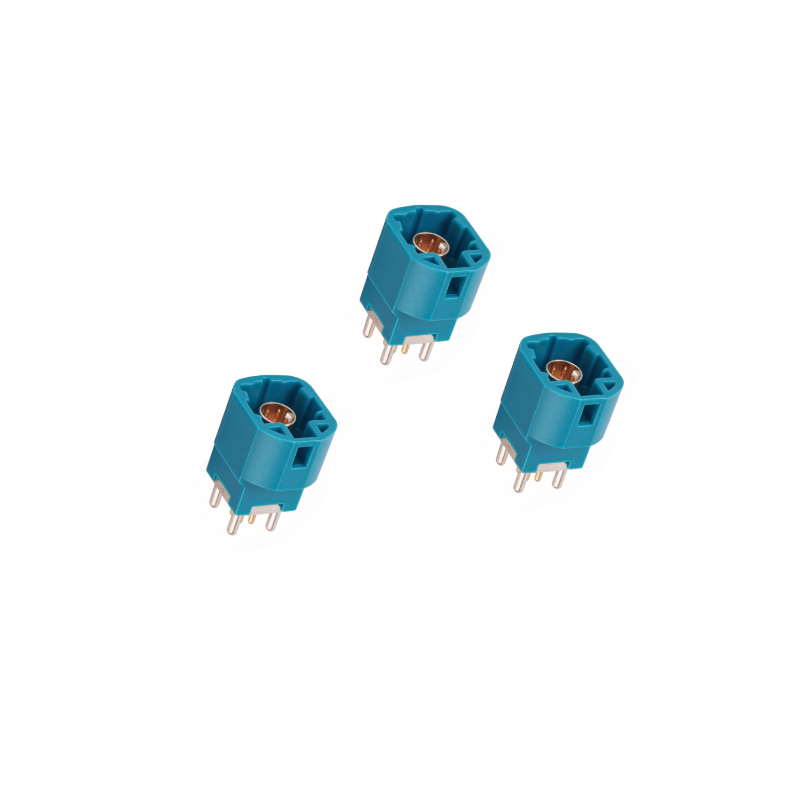
Straight orientations generally provide a cleaner, shorter path from the mating interface down to the internal PCB layers. The straight geometry minimizes parasitic variations. For example, automotive infotainment and camera systems heavily rely on specialized components like the HSD 4P Vertical Connector. Designed for high-speed data transmission, this specific vertical configuration maintains a strict 100-ohm impedance and handles frequencies up to 6 GHz effortlessly. While premium side-entry parts are engineered with internal shielding to mitigate high-frequency losses, they still require rigorous Time Domain Reflectometry simulation during the design phase.
Theoretical mechanics and electrical constraints ultimately collide with real-world assembly requirements. The final choice hinges heavily on system architecture, cable management strategies, and how multiple boards interact within a single chassis.
When routing power or data from an external source, the natural trajectory of the incoming cable should dictate your choice. Forcing a thick wire harness to bend sharply right after the strain relief creates permanent mechanical tension. This risks wire fatigue or accidental pull-out.
If a cable drops down from the roof of an enclosure, an upright port allows it to mate straight in. Conversely, if a cable enters from a side panel and routes along the chassis floor, a side-entry port lets the cable plug in smoothly without a harsh bend. Selecting the proper wire-to-board connectors ensures secure cable management, prevents long-term strain on the conductors, and keeps internal airflow unobstructed.
In complex systems lacking cables, PCBs plug directly into one another. The geometric relationship between these rigid boards strictly determines the required orientation.
Mezzanine Configuration: Two boards are stacked directly on top of each other. This parallel setup demands straight components on both boards to bridge the vertical gap.
Coplanar Configuration: Two boards sit side-by-side on the exact same plane. This edge-to-edge layout requires right-angle connectors on the edges of both boards to mate horizontally.
Mother and Daughter Board: A secondary board plugs into a primary motherboard at a 90-degree angle. This standard perpendicular backplane architecture pairs an upright port on the motherboard with a side-entry plug on the daughterboard.
A notorious engineering pain point often discovered too late during prototyping is the challenge of mechanical alignment. When mating rigid PCBs together, manufacturing tolerances play a massive role in whether the assembly succeeds or binds.
Aligning a single plug into a single receptacle is trivial. However, attempting to bridge two rigid boards using two or more separate component pairs simultaneously introduces severe mechanical headaches. Every PCB fabrication process carries dimensional tolerances. If the distance between Port A and Port B on the motherboard varies by just 0.2mm from the mating daughterboard, the system will bind. Forcing the connection introduces permanent stress into the solder joints. This practically guarantees a field failure.
Mounting orientation directly affects how forgiving the system is to these variations. Vertical Surface Mount components are highly rigid in the X and Y axes. If misaligned, the downward mating force translates into severe shear stress on the pads.
To mitigate tolerance stack-up, engineers should implement locating pegs on the plastic housings. These bosses snap into precise non-plated holes on the PCB before soldering. Relying on delicate electrical pins for mechanical alignment is a dangerous practice. Additionally, specifying floating designs which feature an internal spring mechanism allowing the contacts to shift slightly within the fixed outer shell can absorb misalignment. This prevents transferring destructive stress to the rigid PCB substrate.
Selecting the correct orientation is a process of elimination based on hard design constraints. Use this structured checklist to narrow down your options:
Assess Enclosure Limits: Measure the critical spatial boundaries. If the primary limitation is the overall height of the device casing, you must default to side-entry orientations. If you are dealing with a highly dense layout with strict limits on width and depth, upright orientations are required to conserve surface area.
Determine Mating Frequency: Evaluate how often the end-user or technician will cycle the connection. For high-mating environments, analyze the direction of the insertion force. If you must use a horizontal part in a high-force scenario, mandate through-hole hold-downs in your design to absorb the resulting shear stress.
Identify Cable Routing: Map the physical path of the incoming wire harness. The port orientation should naturally align with the cable trajectory to prevent sharp, tension-inducing bends. This improves long-term reliability.
Review Assembly Methods: Analyze your factory capabilities. Straight surface mount parts are highly optimized for automated pick-and-place machines and standard reflow ovens. Side-entry parts, particularly those requiring through-hole mechanical anchors, may necessitate secondary wave soldering or selective soldering processes. This can increase manufacturing time and overhead costs.
The choice between a vertical versus right-angle connector shapes the mechanical and electrical foundation of your entire PCB design. Upright orientations act as excellent space-savers for horizontal board real estate and offer superior high-speed signal paths. Horizontal designs, meanwhile, are the ultimate problem-solvers for ultra-thin enclosures and parallel cable routing.
Engineers must carefully evaluate the trade-offs involving mechanical shear stress, tolerance stack-up, and high-frequency impedance. By thoroughly reviewing your specific cable trajectories and multi-board mating configurations, you can confidently select the precise component tailored to the rigorous demands of your hardware. If you are finalizing your next board layout, explore the extensive catalog of high-performance components at Jinkeji to find the exact pitch, orientation, and shielding specifications your project requires to ensure long-term reliability.
Not necessarily, but they do experience a completely different type of mechanical stress. Because the mating force is applied parallel to the board, it creates a lever-like action that puts shear stress on the solder joints. To counteract this, through-hole mounting pegs or heavy-duty mechanical hold-downs are often used to reinforce the component against the bare board.
Absolutely. Most complex hardware designs utilize a strategic mix of both. You will typically find side-entry ports placed along the outer edges of the board for external user access such as USB or display ports. Meanwhile, upright ports are clustered in the center of the board for internal cable routing or mezzanine board stacking.
Straight connectors are generally the preferred choice for ultra-high-speed data transmission. They offer a shorter, straighter signal path from the board to the mating cable. This reduces the impedance mismatches and timing skew caused by the physical 90-degree bend found in bent pins. However, premium horizontal connectors are specifically engineered with advanced shielding to mitigate these high-frequency losses.
The base component cost difference is usually negligible for standard pitches. However, side-entry components can sometimes incur slightly higher overall manufacturing costs. This is due to the additional manufacturing steps required to bend the internal pins, the inclusion of mechanical mounting brackets, and the potential need for secondary wave soldering during assembly.
Orientation plays a subtle but important role in airflow and heat dissipation. Upright components stand taller, which can sometimes block horizontal airflow from cooling fans across the board surface. Conversely, side-entry components keep a low profile, allowing air to move freely over hot components like processors or power regulators, making them ideal for thermally dense, low-profile enclosures.
Both orientations are available in a wide variety of standard industry pitches, ranging from micro-pitch sizes like 0.5mm and 1.0mm for compact electronics, up to 2.54mm, 3.96mm, and larger for high-power industrial applications. The choice of pitch depends entirely on your voltage, current, and space requirements rather than the mounting angle itself.


![[XLP-04V] 5.0Pitch 4P Wire End Housing](http://iororwxhimpllk5p-static.micyjz.com/cloud/lqBpkKlmliSRolkpjipjkq/30-XLP-04V-640-640.png "[XLP-04V] 5.0Pitch 4P Wire End Housing")

![[GT8E-10S-HU] 2.0 Pitch 10P Plastic Housing](http://iororwxhimpllk5p-static.micyjz.com/cloud/ljBpkKlmliSRollpqnnrkp/26-GT8E-10S-HU-640-640.png "[GT8E-10S-HU] 2.0 Pitch 10P Plastic Housing")
